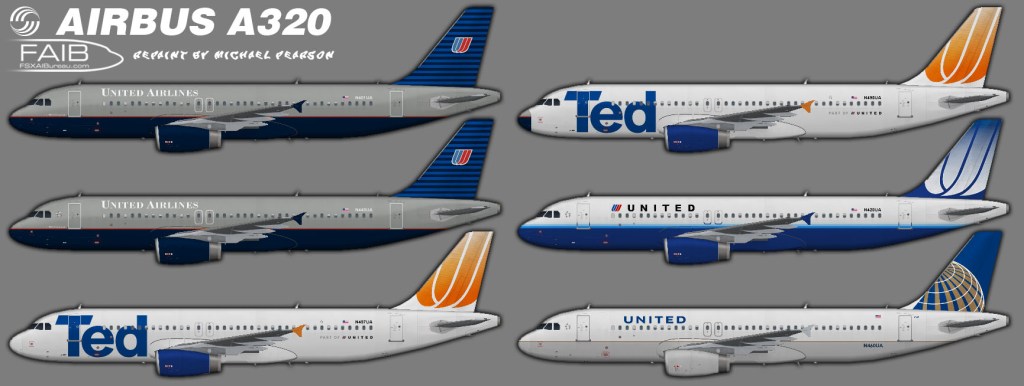
I just went and re-checked both in-sim and through the MCX viewer, and the textures render just fine. These are for the FAIB A320 IAE model, is there the possibility that you inadvertently installed these into the FAIB A320 CFM aircraft folder? That’s the only way I could imagine that the textures would show up blank (black actually), and if you used my aircraft.cfg entries, since there is no IAE model in the CFM folder, they wouldn’t render at all. The other issue I could see is if you are using the PBR models, you would need to put the correct texture.cfg file into each repaint folder to reference the PBR additional textures. If you don’t do this the textures will render but very darkly and would not be really visible (close to blank). These are the only trouble-shooting things I can suggest, but the textures do work as presented for a basic model installation.
Glad you were able to sort it out. I am pretty brutal about my quality-control, but I am human and things slip through sometimes. I just updated the IBE A300 textures, I mis-aligned some doors on about half of them….mp

 Mikey's Retro FS Corner
Textures are blank.
LikeLike
I just went and re-checked both in-sim and through the MCX viewer, and the textures render just fine. These are for the FAIB A320 IAE model, is there the possibility that you inadvertently installed these into the FAIB A320 CFM aircraft folder? That’s the only way I could imagine that the textures would show up blank (black actually), and if you used my aircraft.cfg entries, since there is no IAE model in the CFM folder, they wouldn’t render at all. The other issue I could see is if you are using the PBR models, you would need to put the correct texture.cfg file into each repaint folder to reference the PBR additional textures. If you don’t do this the textures will render but very darkly and would not be really visible (close to blank). These are the only trouble-shooting things I can suggest, but the textures do work as presented for a basic model installation.
Regards,
Mike P.
LikeLike
Fixed. Turns out I was using the FS9 model. Switched to the FSX version, works now.
LikeLike
Glad you were able to sort it out. I am pretty brutal about my quality-control, but I am human and things slip through sometimes. I just updated the IBE A300 textures, I mis-aligned some doors on about half of them….mp
LikeLike